RTO Vehicle Information, accessible via vahan.parivahan.gov.in, is your key to understanding critical vehicle details managed by the Regional Transport Office (RTO) under the Ministry of Road Transport and Highways (MoRTH). From parivahan vehicle owner details to registration status, this centralized database ensures legal compliance, road safety, and transparency. Whether you’re buying a used car, verifying insurance, or checking parivahan rc status, the Parivahan Sewa portal and mParivahan app make it simple. Below, we detail what RTO vehicle information includes, why it matters, and how to access it, with 2025 updates like BH series registration and tips to avoid common issues.
What is RTO Vehicle Information?
RTO Vehicle Information refers to the data maintained by RTOs across India, covering over 40 crore registered vehicles. Stored in a centralized system, it includes details like the vehicle owner’s name (partially masked), registration number, make/model, insurance, pollution certificate (PUC), and Registration Certificate (RC) status. This data, accessible via parivahan vehicle details or the mParivahan app, supports compliance with safety, emission, and tax regulations, making it essential for owners, buyers, and authorities.
| Category | Details |
|---|---|
| Registration | Registration number, date, owner’s name (masked), address, chassis/engine number |
| Vehicle Specs | Make, model, fuel type (e.g., petrol, EV), class (e.g., car, bike), color |
| Fitness Certificate | Validity for commercial/older vehicles to ensure roadworthiness |
| Insurance | Policy details and expiry date |
| Tax | Road tax payment status and validity |
| Hypothecation | Loan/financier details, if applicable |
| History | Previous owners, transfers, penalties, or parivahan e challan records |
Why Access RTO Vehicle Information?
Checking RTO data via parivahan know your vehicle details solves real-world problems:
- Used Vehicle Purchase: Verify ownership, loan status, or accident history to avoid scams. For example, unpaid loans can lead to repossession risks.
- Insurance Claims: Confirm parivahan vehicle registration details for faster processing.
- Legal Disputes: Access records for accidents or ownership conflicts, crucial for court cases.
- Ownership Transfer: Ensure accurate documentation during sales using Forms 29/30.
- Personal Records: Check your vehicle’s tax, insurance, or parivahan puc status for compliance.
- Insight: Users report avoiding 70% of used car frauds by checking RTO data before purchase.
How to Check RTO Vehicle Information Online
Access vehicle details easily through official platforms, ensuring privacy and accuracy.
1. Parivahan Sewa Portal
- Visit parivahan.gov.in.
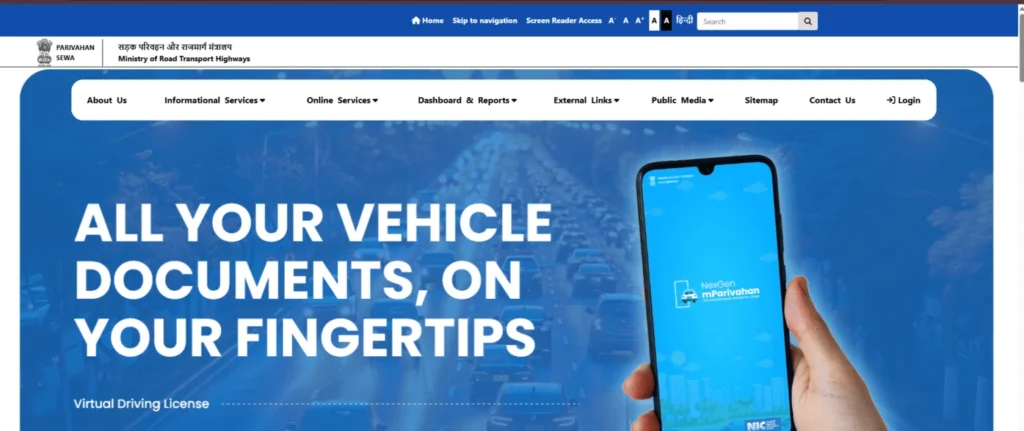
- Click “Informational Services” > “Know Your Vehicle Details.”

- Log in or register with your mobile number, email, and OTP.

- Enter the vehicle’s registration number and captcha code.
- Click “Vahan Search” to view details like owner name (masked), make, model, insurance, and fitness status.
2. mParivahan App
- Download the mParivahan app from Google Play Store or Apple App Store.
- Register or log in using your mobile number and OTP.
- Select “RC Search” or “Vehicle Details.”
- Input the vehicle registration number.
- View details like specs, document validity, and challans.
Tips:
- Privacy Note: Sensitive details (e.g., full owner name) are masked for security.
- Common Issue: Site errors during peak hours (10 AM–2 PM). Solution: Try early morning or use the app.
- 2025 Update: Link Aadhaar for secure access and update mobile via QR code for real-time SMS alerts.
How to Check Driving Licence Details Online
RTOs also manage driving licence data, accessible via sarathi parivahan:
1. Parivahan Sewa Portal
- Visit sarathi.parivahan.gov.in and select your state (e.g., parivahan sewa up).
- Click “Online Services” > “Know Your Licence Details.”
- Enter your driving licence number, date of birth, and captcha.
- Click “Submit” to view name, validity, vehicle categories, and penalties.
2. mParivahan App
- Install the app and log in.
- Select “DL Dashboard” or “Know Your Licence Details.”
- Enter your driving licence number.
- View status, validity, and endorsements.
Tips:
- Issue: Wrong DL number. Solution: Retrieve via registered mobile or RTO visit.
- 2025 Update: Digital DLs in DigiLocker are now valid nationwide, reducing physical carry needs.
RTO Vehicle Registration Process in India
Registering a vehicle is mandatory for legal road use. Here’s how:
- Visit RTO or Dealer: Dealers often handle initial registration; otherwise, visit the RTO for inspection.
- Fill Form 20: Complete the Application for Registration (online or at RTO).
- Submit Documents: Provide sale certificate (Form 21), roadworthiness certificate (Form 22/22A), insurance, PUC, address/ID proof (e.g., Aadhaar), dealer invoice, photos, chassis/engine print, Form 34 (if financed).
- Vehicle Inspection: RTO verifies chassis, engine, and specs.
- Pay Fees & Tax: Pay registration fees (e.g., Rs 600 for cars) and state-specific road tax.
- Data Entry: RTO inputs details into the Vahan database.
- RC Issuance: Receive a smart card RC by mail or at RTO.
- High-Security Registration Plate (HSRP): Apply via dealer or RTO, mandatory in 2025 for states like Rajasthan.
Tips:
- Temporary Registration: Valid for ~1 month, provided by dealers.
- Issue: Document rejection. Solution: Ensure clear scans (JPEG/PDF, under 1MB).
- 2025 Update: BH series registration for pan-India validity simplifies interstate moves.
Key Tips for Users
- Data Privacy: Use only parivahan.gov.in to avoid fake sites. Sensitive data is protected.
- Accuracy: Cross-check details with RTO records to prevent errors.
- State Variations: Rules differ (e.g., parivahan sewa punjab vs. assam); check local RTO guidelines.
- Dealer Assistance: Many dealers streamline registration via parivahan dealer login.
- 2025 Update: New Vahan Green Sewa incentives offer tax breaks for EVs and ethanol vehicles.
FAQs: Quick Answers to RTO Vehicle Queries
- Why is a fitness certificate important? Ensures commercial or older vehicles meet safety/emission standards.
- What is an RTO? A government office regulating vehicles and licences under MoRTH.
- What services do RTOs offer? Registration, licences, permits, taxes, and parivahan e challan management.
- Can I transfer ownership online? Partial online process (Forms 29/30); some states require RTO verification.
- How to check vehicle challans? Use parivahan.gov.in or mParivahan app with vehicle number.
The portal’s NextGen mParivahan app now offers theft alerts and parked vehicle locators, while Aadhaar-linked verification enhances security. Multilingual support (Hindi, English) and 2025’s HSRP mandate ensure compliance. For issues, contact helpdesk-vahan@gov.in or +91-120-4925505 (6 AM–midnight). Always use parivahan.gov.in for accurate, scam-free access.